Tag Archive: “code”
Ridge-o-gram proof of concept
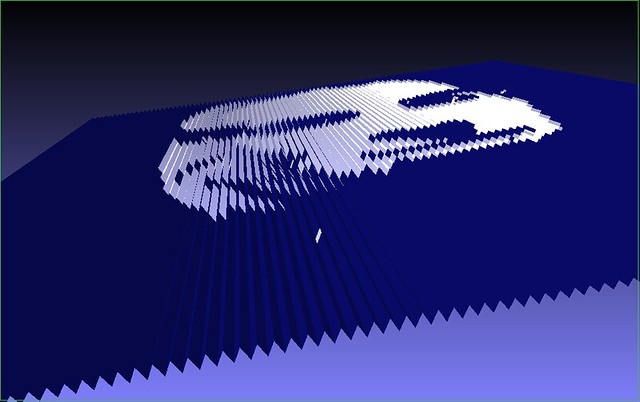
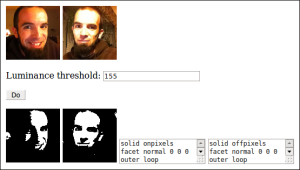
This image shows the first output of a program that converts two black and white images into a pair of interlocking 3D models. The models comprise a ridged surface that presents one image when viewed from the left and the other image when viewed from the right. One model represents the white pixels from both images and the other model represents the black pixels from both images (displayed here in blue).
(Astute observers may notice something odd with the perspective in this video clip – foreshortening is reversed. I had inattentively fiddled with the viewer’s settings before recording the video.)
Is there a name for this kind of display? I’m sure I’ve seen folded posters or other artwork that utilizes this effect, but without knowing applicable terms I haven’t had much luck finding examples.
The present implementation is a proof of concept. Only the ridged upper surface is currently generated. The plan is to generate a solid base as well, with the eventual goal of producing a two-piece panel that can be printed as single assembly with a dual-extruder 3D printer like the Makerbot 2X. I’d like to make it available as a web site.
Posted on Saturday, November 16th, 2013.
Mobile Mouse 3 and mmserver
Interested in the news regarding my stewardship of mmserver, the unofficial Mobile Mouse server for Linux? Changes since the last release include partial support for clipboard sync (pull computer clipboard to phone clipboard with a hotkey), support for modifier keys applied to mouse clicks, a workaround to ignore duplicate click events, support for “keystrings” (text input when shift lock is applied – unclear what it’s for, but at least now it works), and last but not least, compatibility with the recently-released Mobile Mouse 3 apps. No easy installer yet, but anyone who actually uses mmserver has presumably already figured out how to pull updates from Github – so just do it again!
Posted on Thursday, October 31st, 2013.
Heightmap to STL
Hacked together a little tool called hmstl. It converts a heightmap – a grayscale image in which brighter pixels are interpreted as higher elevations – to STL, a format suitable for 3D printing.
Posted on Wednesday, October 30th, 2013.
Mobile Mouse Server for Linux 1.4.0
Bundling up a bunch of little tweaks to my fork of Mobile Mouse Server for Linux and calling it version 1.4.0. Get it here. Main changes include:
- Support for gesture commands (configured like hotkeys)
- Added option to ignore keyboard input
- Using
xdg-opento edit config file for greater compatibility across systems - Changes to icon and config file loading, towards goal of simpler external dependencies
- More detailed log messages and config file comments
At present mmserver must still be compiled manually. A goal for the next release is to make use of some package management system to take care of setup automatically.
Posted on Friday, September 27th, 2013.
Cesium Exposure
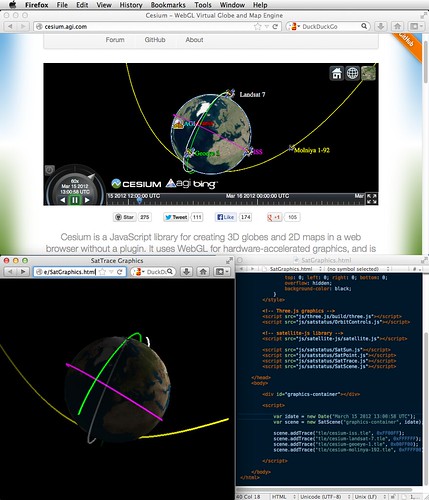
Last weekend I discovered Cesium, a sophisticated WebGL virtual globe engine developed as an open source project by AGI. Among other things, it can be used to interactively display satellite orbits in 3D in a web browser…
…which is exactly what I’ve been building in SatStatus, my summer “coffee shop programming project”. So, I admit I felt discouraged to discover I was not the first to develop the concept. However, it also feels good to realize that I, operating as a hobbyist and enthusiast only, identified the same niche and was able to build a visualization tool with comparable core capabilities (see screenshot at right).
SatStatus exists as pretty rough proof-of-concept code (I’m learning Javascript as I go), whereas Cesium appears to be put together with an admirably rigorous testing and review process. Cesium also has many more features than SatStatus. Some, like support for surface terrain and arbitrary feature markup, are beyond the scope of what I had planned; others, like ready-made reference time controls and multiple camera modes, were on my to-do list.
One difference is that SatStatus was designed from the start to be able to propagate satellite locations in real-time using a set of recent TLEs and Shashwat Kandadai’s Javascript implementation of the SGP4/SDP4 algorithm. If my cursory reading of the documentation is correct, this is possible in Cesium as well, but only by streaming satellite positions as CZML markup from another source. (To be clear, this is reasonable, given that Cesium is a general purpose display engine, whereas real-time satellite tracking is just one specific application.)
Now I must decide how to proceed. It is certainly satisfying to build something from scratch, but now that I know something very similar is already available, it would make sense to fast-forward my effort to focus on the web site I eventually planned to build around the 3D viewer.
Besides the goal of powering a new public real-time satellite tracking site, SatStatus was also intended as a “portfolio project” to learn about Javascript development, graphics programming, and the varied interest many Earthlings have in monitoring our space-based assets. That goal can still be met, with the added benefit of a good example to study, by participating in the Cesium project.
Posted on Saturday, September 21st, 2013.
Chipmunk Basic Stuff on GitHub
I’ve posted a bunch of my old Chipmunk Basic sample code to a Chipmunk Basic Stuff repository on GitHub. Much of it is still available on this page, but that page will not be updated and may be deleted.
As with the Applescripts I posted a few weeks ago, I’m stowing this archival stuff on GitHub for two reasons:
- It provides a nice online interface for glancing at the code and revision history.
- I’d like to prune some of the dustier old pages from this site without culling the content from the internet altogether. (Stats indicate a small but steady stream of people searching for Chipmunk Basic information do end up here.)
Posted on Thursday, September 12th, 2013.
Yojimbo Scripts on GitHub
My Yojimbo Scripts repository contains a bunch of old scripts (sans documentation, unfortunately) for use with Yojimbo. Most but not all have previously been posted here. I am posting them now as a single collection on GitHub in order to make it easier for others to find and make use of the code.
Posted on Wednesday, August 28th, 2013.
Finder Scripts on GitHub
My Finder Scripts repository now houses the AppleScripts I wrote for use with the Mac OS X Finder. GitHub provides a better interface for browsing code, managing revisions, and collecting feedback than ad hoc blog posts. In the interest of making my old scripts more accessible to anyone who may find them useful, I intend to re-release them all as open source git repositories.
- LSelect – select files using shell glob syntax (matching against filenames)
- Select Grep – select files using grep (matching against [text] file contents)
- Open As – create and open an explicitly named duplicate of the selected file
Posted on Wednesday, August 28th, 2013.
QR9000
Send me a tweet – a URL, for example – and I’ll reply with a QR code representation. The pod bay doors stay closed, though.
— QR9000 (@QR9000) May 4, 2013
I made a Twitter bot named QR9000 that replies to mentions with the text of the tweet encoded as a QR code. Here’s the source code.
QR codes are a machine-readable format for the visual storage of arbitrary information. Evidently they were initially used to tag components on automotive assembly lines; it’s easy to imagine the manufacturing benefits you’d get, in terms of modular tooling, from handling each part as it arrives rather than relying on a pre-programmed sequence.
Today, QR codes are often seen in marketing materials intended to be scanned by people with smartphone apps instead of industrial robots. I am unconvinced that QR codes are better for advertising purposes than old-fashioned human-readable text and images; in many cases, they undoubtedly complicate tasks that should be straightforward.
But, like Cyberdyne Systems, the HAL laboratory at Urbana, Illinois, and innumerable other well-intentioned rogue AI creators, I made the bot anyway. Tweet it a URL and it’ll give you a QR code!
Posted on Monday, May 6th, 2013.
Eclipse Online recipe
I made a Calibre recipe for Eclipse Online, a free short fiction magazine edited by Jonathan Strahan and hosted by Night Shade Books.
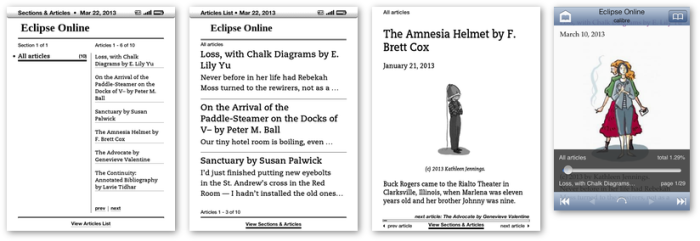
Like Strange Horizons, Eclipse Online is published only as a web site. This recipe assembles an ebook from recent posts and stories. Get more details and the script itself at Github.
Update: Sadly, only a month or so after I discovered Eclipse Online and wrote this recipe, the magazine was closed and will no longer be published.
Posted on Friday, March 22nd, 2013.