Search with Google Scholar Service
Download this service (53 KB; might require Snow Leopard), unzip it, and install it in ~/Library/Services. Then select some text, right-click the selection, and choose “Search with Google Scholar” to find related articles. If the text you selected is the title of a paper, chances are the first result will include exactly what you want: a PDF copy of the paper, or at least an abstract.
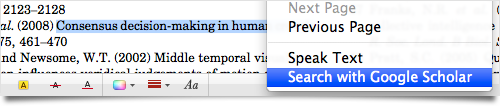
This service is shamelessly derived from the “Show Address in Google Maps” service that ships with Mac OS X 10.6.
3 Responses to “Search with Google Scholar Service”
Posted by MJ Valente on Sunday, March 28th, 2010 at 10:13 AM.
Thank you so much for this. :) It will save me lots of time in google scholar searching.
Posted by Jim on Monday, March 29th, 2010 at 5:40 PM.
Thanks, MJ! I’m glad you find it useful.
Posted by Rahul on Friday, January 25th, 2013 at 7:36 PM.
Thank you for this very useful tool. Now I don’t have to copy the text in google, open a separate scholar tab and paste in there.